






-
TAKÇALIŞTIR.
-
You DO NOT NEED TO MAKE ANY CONNECTION ENOUGH TO PLUG the RX CABLE into the RECORDING DEVICE. You can use the microphones as A Bluetooth microphone alone. You can watch the connection in the product video Features 1. Body material: ABS 2.4G solution: JieLi AD6976M4 3. Working system: GFSK 4. Operating frequency: 2.4G-2.4835GHz 5. Radio sensitivity: -38db 6. Effective distance: 10 meters or greater 7. Transmitter shutdown power consumption: 2uA 8. Transmitter operating power consumption: (video mode) 25mA 9. Transmitter operating power consumption: (Bluetooth mode) 30-40mA 10. Receiver operating power consumption: 14mA 11. Microphone signal-to-noise ratio: 65db or greater 12. Frequency response: 20Hz-20KHz 13. Monitoring: One-way monitoring 14. Microphone: Electret 15. Battery: 300mAh 16. Talk time: 10 hours or greater 17. Waiting time (closed state): 6 months 18. Charging input standard: DC-5V/Max.
-
200+/-10mA 19. Charging time: 1.5-2 hours Features 1. Supports Bluetooth mode and video mode 2. Supports Dodge function 3. Supports reverb function 4. Automatic matching 5. Supports tracking 6. Action cameras Suitable for mobile phones, computers, sound cards, mixers, effectors.
-
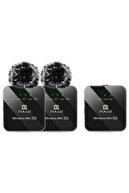
Packing List 1. Receiver x 1 2. Microphone transmitter x 2 3. TRS 3.5 mm - TRS 3.5 mm audio cable x 1 4. OTG cable x 2 5. Type-C charging cable x 3 6. Monitoring headset x 2 7. windproof case x 2 8. Storage bag x 1 9. Instruction manual x 1 10. Packaging box x Instructions for Use (Transmitter Wireless Microphone TX 1. Press the power button for 1 second, the video mode indicator light will light up and the link light will flash.
-
If you hear the "Video Mode" sound from the headset at the same time, the device will turn on successfully and the connection will be expected.
-
Press the power button for 3 seconds, the transmitter will turn off and then all indicator lights will turn off.
-
- After turning on the transmitter, it will automatically connect to the receiver (Receiver needs to be turned on).
-
The connection indicator is always on after pairing, the device can record wirelessly.
-
Click the volume button to increase or decrease the recording volume according to your request.
-
- Double-click the power button to switch to silent mode, repeat the button movement to restore the "off recording" and "start recording" warning.
-
Click the power button to switch between Bluetooth mode and video mode (default video mode when on).
-
- In Bluetooth mode, you can connect to the device to play background music.
-
Press the volume up button for 2 seconds to turn on/off the “Dodge” mode.
-
After entering the Dodge mode, the background sound is automatically dimmed when the main sound is heard and the effect of the main recording is highlighted.
-
(This feature is only available in Bluetooth mode) 5. Press the volume down button for 2 seconds to turn the echo on/off.
-
- When the battery is low, the charging indicator flashes red and a “battery low, please charge” sound is heard.
-
In the meantime, turn off the device and charge it immediately.
-
The red light illuminates continuously during charging and turns off when fully charged.
•
•
•
•
•
•
•
•
•
•

favorite
Favoritesaccount_circle
Sign Inshopping_bag
Cart Catalogue
